





 Table Of Contents
What’s New
Flashpoint Managed Attribution now allows you to change the Exit Location for your virtual machine on demand, without interrupting your workflow.
Why It Matters: Flexibility, Control, and Efficiency
This feature is a direct response to customer feedback. It helps you stay on task by providing more control and flexibility in your investigations. This feature offers:
- Enhanced control: As an investigator, you often need to virtually place yourself in different geographic locations to conduct thorough research, mimic specific threat actors, or view region-locked content.
- Greater efficiency: Previously, changing an Exit Location required support from Flashpoint’s Customer Success team. Now, you can make the change yourself in seconds, speeding up your workflow.
Improved user experience: This feature offers a smoother, more flexible experience that ensures your MA connection perfectly supports your dynamic investigative needs.
How It Works: Simple and Immediate Access
Changing your virtual geographic location is quick and intuitive, so you can keep the ball rolling.
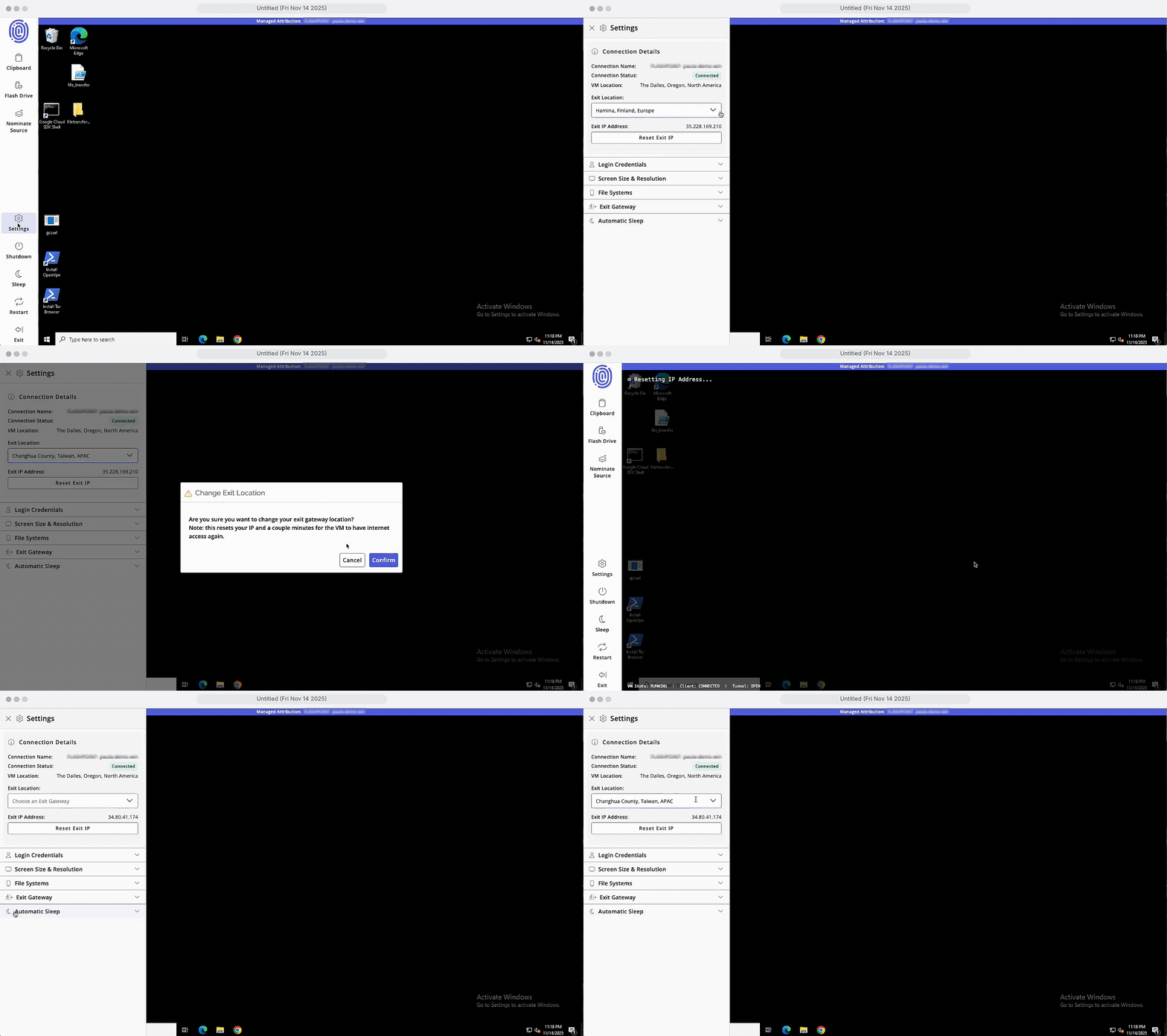
- Log in to Flashpoint Managed Attribution and open the side panel.
- Select your desired location from the dropdown menu.
- When prompted, click Enter to acknowledge the change.
This allows you to select the geographic location that best supports your investigation at that moment, giving you complete autonomy over your connection.
To learn more about Flashpoint Managed Attribution, schedule a demo with our team.