How to Identify Ransomware Data Exposure Using Leaked File Trees
Ransomware leak sites can expose sensitive data belonging to an organization's customers and suppliers. In this blog Flashpoint, analysts explain how to search leaked file trees, investigate potential exposure, and monitor future leaks using Flashpoint Ignite.
 Flashpoint



An organization does not have to be the direct victim of a ransomware attack to have its data exposed. When attackers steal information from a supplier, customer, or business partner, the resulting leak can contain sensitive files belonging to other organizations, including contracts, financial records, and proprietary engineering data.
Ransomware and data extortion groups frequently publish file trees, or directory listings of stolen data, on their leak sites. These listings can reveal internal server names, cloud storage environments, project directories, and references to customers and suppliers. For organizations connected to the victim, they may provide the earliest indication that their information was included in a breach.
However, investigating these leaks has traditionally required navigating Tor-hosted infrastructure and potentially downloading hundreds of gigabytes of stolen data. Flashpoint has introduced Ransomware Files as a searchable data type in Flashpoint Ignite, making it faster to tell whether an organization, its third parties, or its customers appear in a leak. Users can search leaked file names, monitor newly published data, and request analyst review of the matches that matter.
Searching Ransomware File Trees in Flashpoint Ignite
Flashpoint collects ransomware victim posts and builds file trees for supported leak sites. Depending on how the stolen data is published, Flashpoint either crawls the site’s directory structure or downloads and extracts the leaked archives.
The resulting file paths are searchable through the Ransomware Files tab in Flashpoint Ignite’s Collections search.
Users can search filenames and filter results by date, ransomware group, victim name, and file type. Each result includes the full file path, associated victim, ransomware group, file type, file size, and date, with a link to the original ransomware victim post.

Ransomware victim posts also display a sample of leaked files and provide a direct link to search the complete collection of file paths associated with that incident.
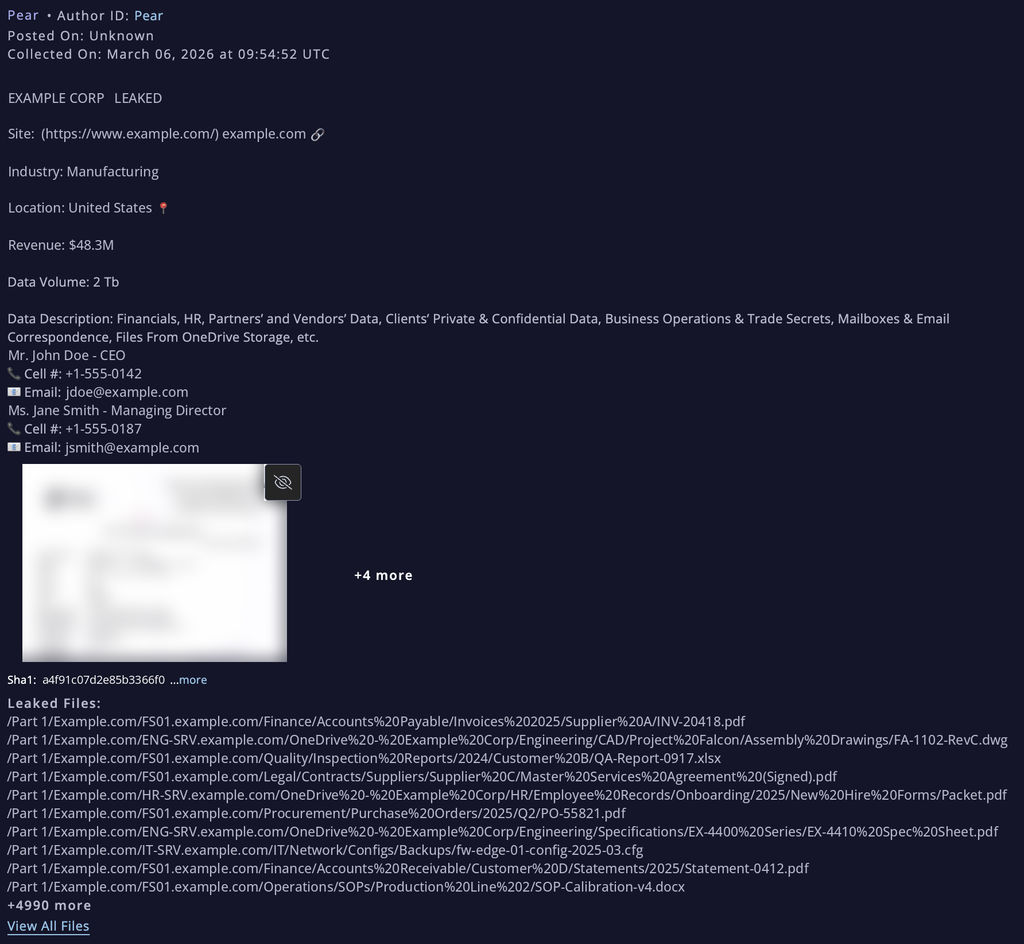
This allows analysts to identify potentially relevant files before requesting access to the underlying data.
What Should Organizations Search For?
Searching for an organization’s name or primary domain is a useful starting point, but sensitive data may appear under internal identifiers or within a business partner’s directory structure.
Flashpoint recommends searching for:
- Corporate domains: Primary, legacy, and regional domains that may appear in file paths.
- Internal infrastructure: File server hostnames, network share names, and other distinctive system identifiers.
- Cloud environments: Microsoft 365, OneDrive, and SharePoint tenant names.
- Business and technical identifiers: Product names, project codenames, and part number prefixes.
- Third-party relationships: Supplier and customer names, particularly where they may appear in contract, invoice, quality assurance, or audit directories.
Distinctive identifiers generally produce more useful results than common business terms. Searches using generic names can be narrowed with the Victim Name or Ransomware Group filters.
For example, an organization might search for a legacy domain, an internal file server hostname, or a product codename to identify references within leaked files. Searching for critical supplier names can also help identify incidents where the organization’s information may have been exposed through a third party.
Monitoring New Ransomware Leaks
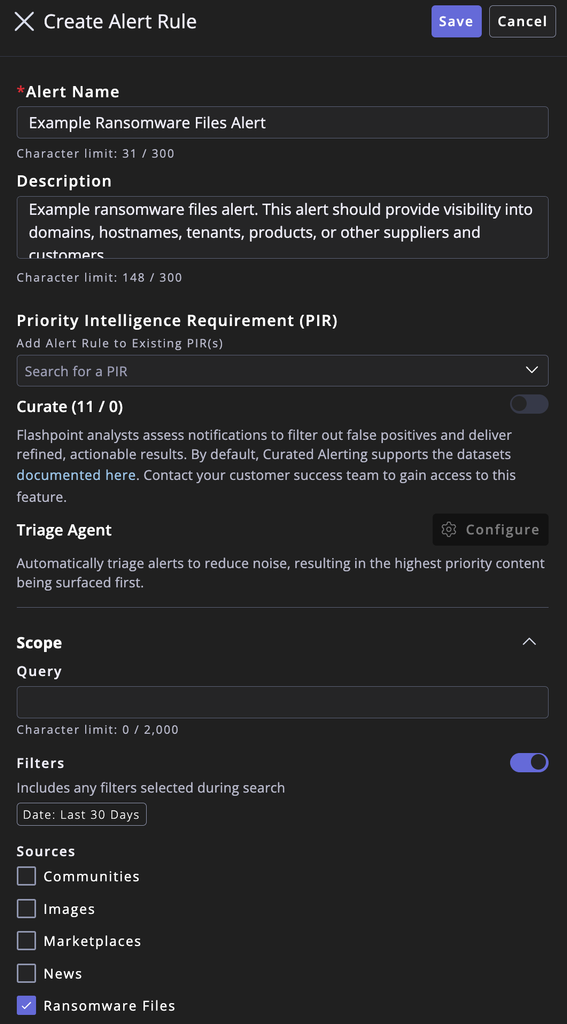
Organizations can save searches for Ransomware Files and create alerts for matching file paths as new leaks are processed.
Alerts can be delivered within Flashpoint Ignite, by email, or through Slack. Additionally, security teams can establish separate searches for their own identifiers and those of critical suppliers and customers, allowing relevant findings to be directed to the appropriate teams. Teams that work in AI assistants or automated workflows can also access Ransomware Files through Flashpoint’s MCP server.
Importantly, a filename match indicates potential exposure, not confirmed compromise. A file path may reference an organization without containing its sensitive data. When a match warrants further investigation, users can submit a Request for Information (RFI) from the associated victim post, identifying the relevant paths so Flashpoint analysts can provide the underlying files for review.
Case Study: Using Ransomware File Trees to Investigate Third-Party Exposure
When a ransomware or data extortion group compromises an organization, the impact rarely stays with the victim alone. Manufacturers, service providers, law firms, and other partners often hold data belonging to their customers and suppliers. A breach at one company can therefore expose information about many others, often before those organizations know an incident has occurred.
What Happens After a Ransomware or Extortion Attack
Most extortion operations follow a similar pattern after gaining access. The group exfiltrates data, contacts the victim with a ransom demand, and, if the victim does not pay, lists the organization on a leak site. Listings often start with a claim and a countdown timer. They may then progress to sample files, a file tree or directory listing, and eventually a partial or full data dump.
Several features of this process matter for defenders:
- Listings change over time. Groups frequently update a listing’s size, file count, or contents after it is first posted. Different sources may therefore report different figures for the same leak, and those differences should be documented rather than assumed to be errors.
- Actor claims are not confirmation. The size, scope, and contents a group advertises are claims until they are corroborated by the files themselves or by the victim.
- Victim disclosures are often limited. Affected organizations may confirm an incident without specifying what data was taken or how access was gained, leaving partners to assess their own exposure.
What a Leaked File Tree Can Reveal
A file tree is often the earliest and most detailed view of what an attacker collected. Directory structures typically reflect how the victim organized its data, including domain names, internal file servers, mapped drive letters, and cloud storage tenants such as OneDrive or SharePoint.
Directory names alone can indicate the categories of information potentially affected, such as:
- Financial and procurement records, including invoices organized by supplier or customer.
- Engineering and product data, including CAD files, design specifications, and standard operating procedures.
- Quality control, testing, and inspection records.
- Human resources, legal, and contract files.
- IT and security records, such as system logs, configuration files, and validation records.
For a third party, this structure provides a practical starting point. A supplier or customer can search a file tree for its company name, product identifiers, project codenames, contract numbers, or employee names. Matches in invoice, engineering, or legal directories can then be prioritized for closer review.
How File Tree Visibility Helps Mitigate Risk
Knowing what a leak contains, or may contain, lets organizations act before exposed data is misused:
- Scope potential exposure quickly. Identify which business relationships and data types may be involved without waiting for the victim’s disclosure.
- Prioritize response. Focus investigation on directories most likely to hold sensitive information, such as credentials, intellectual property, or personal data.
- Support legal and regulatory decisions. Give legal and privacy teams early evidence for assessing contractual obligations or notification requirements.
- Anticipate follow-on threats. Leaked invoices and correspondence can enable business email compromise, invoice fraud, and targeted phishing. Leaked credentials or configuration files may enable direct intrusion.
- Monitor future leaks. The same identifiers used to search one file tree can feed ongoing alerts covering other partners that may be compromised later.
Using Flashpoint Ignite, an analyst can filter Ransomware Files results to a specific victim, search for relevant paths, and submit an RFI for the underlying files. Those identifiers can then be saved as alerts to watch for future leaks involving other business partners.
What a File Tree Can and Cannot Confirm
File trees support an initial assessment, but they also have limits. A company name appearing in a directory does not establish that its systems were breached or that sensitive information was exposed. Folder names can be misleading, outdated, or empty. The files themselves must be examined to determine their contents and relevance.
The directory structure can still support assessments of how data was collected. Paths to internal file servers are consistent with collection from network shares, while cloud-sync paths indicate that cloud storage was also represented in the dataset.
Under the MITRE ATT&CK framework, these patterns are commonly consistent with Network Share Discovery (T1135), Data from Network Shared Drive (T1039), and Data from Cloud Storage (T1530), and extortion activity aligns with Financial Theft (T1657).
These mappings describe activity consistent with the available evidence. Unless the victim or investigators confirm them, the initial access vector and exfiltration methods should remain unattributed.
Investigate Ransomware Data Exposure With Flashpoint
Ransomware victim lists identify organizations targeted by extortion groups, but the accompanying file trees can reveal a broader set of potentially affected businesses. For suppliers, customers, and other partners, those directory listings may provide the first indication that their information is present in a third-party breach.
With Ransomware Files in Flashpoint Ignite, organizations can search leaked file paths, monitor relevant identifiers, and request analyst review of matches that require further investigation.
Request a demo to see how Flashpoint helps security teams investigate ransomware exposure and identify sensitive data that may have surfaced through third-party incidents.
See Flashpoint in Action
Get real-time curated data, expert analysis, and AI-driven insights to monitor threats across the surface, deep, and dark web—including closed sources.